
EMAK Telecom Call Center Queue Settings
The EMAK Telecom call center routes inbound calls into queues and distributes them to agents on your phone system as agents become available. The call center has a rich set of routing rules so you can define exactly how calls are matched to agents, how long callers wait, and what happens when no one is available. This article explains every setting available when you configure a call center queue.
Call Center Basics
A call center is built from two parts:
- Agents — users on your phone system who answer queue calls. An agent can belong to several queues, and can sign in or out of a queue at will. While an agent is signed out, the system skips them so callers do not wait on someone who is unavailable.
- Queues — the holding area where incoming calls wait until an agent becomes available.
Routing Strategies
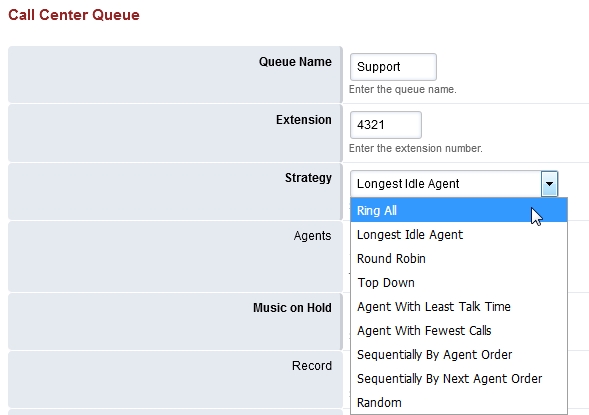
The strategy decides which agent receives an incoming call. If the chosen agent does not pick up, the system continues to try other agents according to the same strategy until the call is answered or the queue’s Max Wait Time is reached.
- Agent with Least Talk Time — rings the agent who has spent the least time on calls.
- Agent with Fewest Calls — rings the agent who has handled the fewest calls.
- Longest Idle Agent — rings the agent who has been idle the longest within their tier.
- Ring All — rings every agent in the queue at the same time.
- Random — picks an agent at random with no defined order.
- Ring Progressively — starts with the top agent and adds more agents to the ring as time passes, until everyone is ringing.
- Round Robin — rings the next available agent in line.
- Sequentially by Agent Order — rings agents one at a time, following the order set by tier and tier position.
- Top Down — rings agents in fixed order, starting from position one.
Agents
Pick the agents who belong to this queue from the drop-down list, and set each agent’s tier level and tier position. Tiers determine the order in which agents are tried when the strategy uses tier rules.
Music on Hold
Choose the audio that callers hear while they wait. You can use uploaded music on hold files, streaming sources, or ringtones — see Music on Hold Samples for licensed options.
Time Settings
Time Base Score
- Queue — the wait timer starts when the caller enters this queue. If the caller is moved to a different queue, the timer restarts.
- System — the wait timer starts when the caller enters the phone system. If the caller picks the wrong queue first, their wait time carries over when they reach the correct queue.
Max Wait Time
The maximum time a caller can wait in the queue before the timeout action runs. 0 is the default and means no limit. Any other value is in seconds.
Max Wait Time with No Agent
How long a caller can wait when no agents are signed in to the queue. The default is 90 seconds. When this time is reached, the timeout action runs.
Max Wait Time with No Agent Time Reached
The follow-up timer used after the no-agent threshold is hit. The default is 30 seconds. We recommend keeping this short so callers do not wait in a queue indefinitely when no agents are signed in.
Timeout Action
The action to take when any of the wait time limits above are reached — for example, sending the call to a voicemail box, an IVR, or another queue.
Tier Rules
Tier rules let you escalate a call from one tier of agents to the next over time.
Tier Rules Apply
- True — apply the tier rules; only the defined tiers are used.
- False — ignore tier rules; every tier is used at once.
Tier Rule Wait Second
How long the caller waits before the queue moves on to the next tier of agents. The default is 30 seconds.
Tier Rule Wait Multiply Level
- True — the wait between tiers grows with each tier (the value is multiplied as the call progresses).
- False — once the configured wait time elapses, the queue runs through every remaining tier in order with no wait between them.
Tier Rule No Agent No Wait
When set to True, the queue does not wait for an agent at a tier that currently has no agents signed in — it moves on immediately. When set to False, the queue still observes the configured wait at each empty tier.
Abandoned Calls
Discard Abandoned After
How long the system remembers an abandoned call and the position it held in the queue. The default is 900 seconds (15 minutes).
Abandoned Resume Allowed
- True — if a caller hangs up and calls back within the discard window above, they keep their original position in the queue.
- False — abandoned callers go to the end of the queue when they call back.
Announcements and Caller ID
Caller ID Name Prefix
A prefix added to the caller ID name when the call is delivered to an agent — for example, [Sales] — so the agent immediately sees which queue the call is from.
Announce Sound
An audio file to play to the caller every Announce Frequency seconds while they wait. Use the full path to a .wav file.
Announce Frequency
How often the Announce Sound is played to the caller, in seconds.
Exit Key
The DTMF keys a caller can press to exit the queue and follow the timeout action. Useful for offering “press 0 to leave a message” without waiting for the timeout.
Description
Free-text description for the queue so administrators can quickly recognize what it is for.
Agent Sign-In
Agents can sign in to the call center by dialling *22 from their phone, or by signing in through the EMAK Telecom web interface. Admin and Super Admin accounts can also sign other agents in or out on their behalf.
Call Center FAQ
Which strategy should I use?
For most teams, Longest Idle Agent distributes calls fairly while keeping average answer times low. Use Ring All when you want any available agent to grab the call. Use Top Down or Sequentially by Agent Order when you have specialist agents who should always answer first.
What is the difference between Queue and System time base scoring?
If you only have one queue or always want the wait timer to reset on each transfer, use Queue. If a caller might enter the wrong queue from your IVR and you don’t want to penalize them with a fresh wait when they reach the right queue, use System.
How do agents sign in and out of the queue?
From any EMAK Telecom phone, the agent dials *22 to toggle their queue status. Agents can also sign in and out from the EMAK Telecom web interface. Admin and Super Admin users can manage agent status on behalf of others.
What happens to callers when no agents are signed in?
The queue waits up to Max Wait Time with No Agent seconds (default 90), then runs the timeout action — for example, sending the call to voicemail. We recommend keeping this value short and configuring a clear timeout action so callers are not left listening to hold music indefinitely.